[Skip to content](https://www.hubspot.com#main-content)
[](https://www.hubspot.com/startups)
- [Resources](https://www.hubspot.com/startups/resources) Show submenu for Resources
- [Fundraising](https://www.hubspot.com/startups/fundraising)
- [Sales & Marketing](https://www.hubspot.com/startups/sales-and-marketing)
- [AI Tech & Tips](https://www.hubspot.com/startups/ai)
- [Tech Stack Guide](https://www.hubspot.com/startups/tech-stacks)
- [Founder & VC Insights](https://www.hubspot.com/startups/scaling-smarter)
- [Podcast](https://www.hubspot.com/startups/podcast)
- [Stories](https://www.hubspot.com/startups/stories) Show submenu for Stories
- [Digital Magazine](https://www.hubspot.com/startups/magazine)
- [DocuSeries](https://www.hubspot.com/startups/docuseries)
- [Case Studies](https://www.hubspot.com/startups/stories/customers)
- [Community](https://www.hubspot.com/startups/community)
- [Partner](https://www.hubspot.com/startups/partners)
- [Apply Now](https://app.hubspot.com/signup-hubspot/hubspot-for-startups)
- [Resources](https://www.hubspot.com/startups/resources) Show submenu for Resources
- [Fundraising](https://www.hubspot.com/startups/fundraising)
- [Sales & Marketing](https://www.hubspot.com/startups/sales-and-marketing)
- [AI Tech & Tips](https://www.hubspot.com/startups/ai)
- [Tech Stack Guide](https://www.hubspot.com/startups/tech-stacks)
- [Founder & VC Insights](https://www.hubspot.com/startups/scaling-smarter)
- [Podcast](https://www.hubspot.com/startups/podcast)
- [Stories](https://www.hubspot.com/startups/stories) Show submenu for Stories
- [Digital Magazine](https://www.hubspot.com/startups/magazine)
- [DocuSeries](https://www.hubspot.com/startups/docuseries)
- [Case Studies](https://www.hubspot.com/startups/stories/customers)
- [Community](https://www.hubspot.com/startups/community)
- [Partner](https://www.hubspot.com/startups/partners)
- [Apply Now](https://app.hubspot.com/signup-hubspot/hubspot-for-startups)
# 5 Top Project Management Tools for Startups
A look at the top 5 project management tools used by HubSpot users.

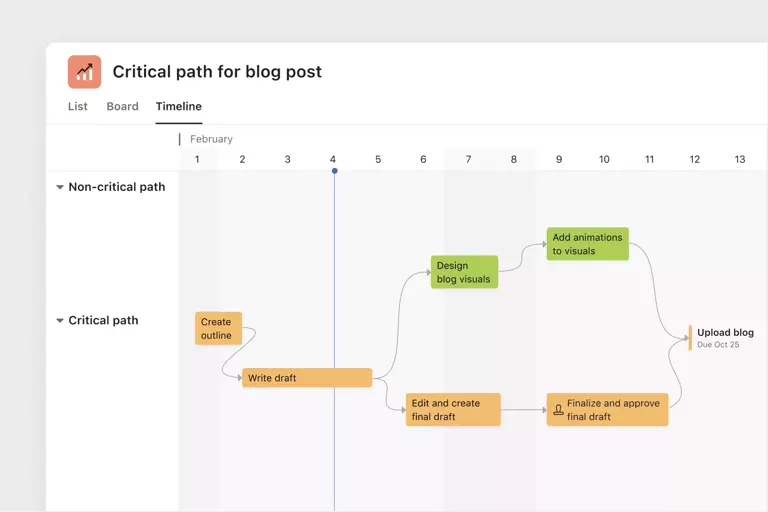
Effective project management is crucial for startup businesses, especially if you want to scale or release new products and services. Project management solutions are also central in [Agile methodology](https://asana.com/resources/agile-methodology), which most businesses practice nowadays. In a nutshell, Agile methodology, or simply “Agile, is an iterative process of project management (typically dividing a project into “sprints”) that allows for quick execution, testing, feedback, collaboration, and where necessary, change. It also involves being able to quickly adapt to changes in strategy and execution, whether it’s due to unexpected hurdles in the process or sudden changes in the market.
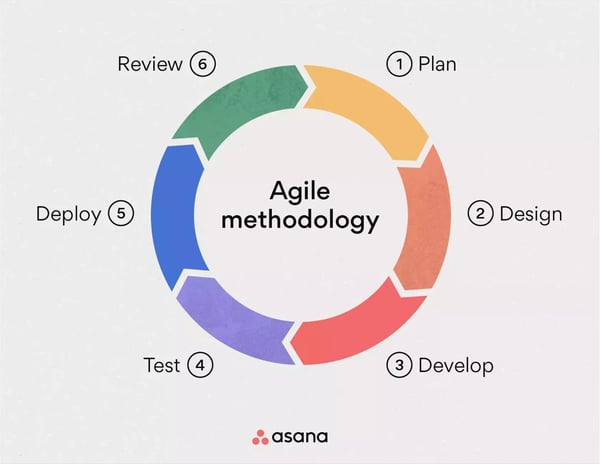
Image source: [Asana](https://asana.com/resources/agile-methodology)
Some examples of sub-methods and practices under Agile methodology are Scrum, Kanban, and Extreme Programming.
Among the benefits of Agile project planning and execution for startups, are optimized operations, more streamlined workflows, and improved customer experience.
Here are some key features to look out for in project management software for startups:
- A clean, user-friendly interface
- Real-time collaboration
- Kanban boards to easily visualize task status at each stage
- Milestones and goals to work towards
- Easy assignment of tasks and priority-setting
- Gantt charts for data visualization
- Accessibility and affordability
- Seamless integration with other tools
In this post, we’ve put together a list of the top five project management tools used by HubSpot users (based on installment and HubSpot integrations stats).
## Asana
[Asana](https://asana.com/uses/project-management) is a project management tool that reduces silos between cross-functional teams or groups of people from different departments working on a specific project or goal. It does this through cross-team portfolio management that can connect specific work items to larger goals within one record.
So, for example, if marketing, sales, IT, and product teams are all working on one project—like an e-commerce site—Asana can serve as a source of truth for all teams as they work on it.
The platform also allows users to add tasks to multiple projects, with updates synced in real-time across all related projects and portfolios. It also features a “critical path” for crucial tasks so teams can prioritize time-sensitive deliverables and shift priorities as needed.
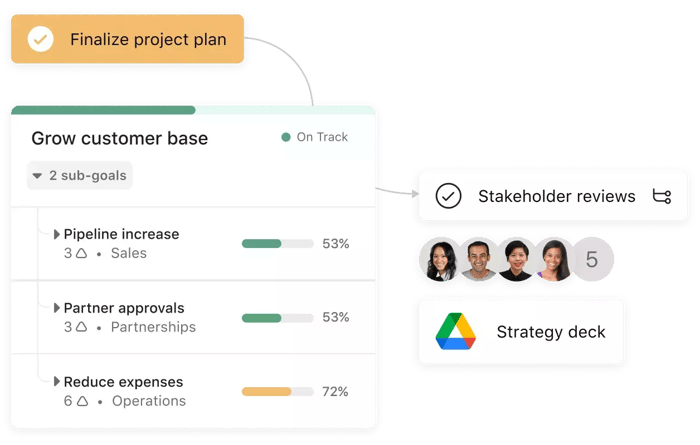
Asana has templates for project reporting, planning, kickoff meetings, action items, Kanban boards, and Gantt charts for easy visualization. You can also set rules for tasks to automate repetitive processes or stay on top of online activity. For example, you can set rules to get email notifications when a team member updates a task status or leaves a comment on any of your action items.
Asana’s Basic plan offers basic functionalities like tasks, projects, messages, and more, for free. The Premium plan starts at $10.99 monthly per user and offers more advanced features like task templates and advanced search. The Business plan, which starts at $24.99/user/month, unlocks more automation, reporting tools, and other features suited for larger teams and companies.
* * *
Asana has templates for project reporting, planning, kickoff meetings, action items, Kanban boards, and Gantt charts for easy visualization. You can also set rules for tasks to automate repetitive processes or stay on top of online activity. For example, you can set rules to get email notifications when a team member updates a task status or leaves a comment on any of your action items. Teams can also integrate with over 300 third-party integrations that are ready out-of-the-box, including HubSpot, Slack, Gmail, Microsoft Teams, and more, accessing key information from their favorite tools in one place__.__
### HubSpot Integration
The Asana for HubSpot integration allows teams to keep track of important context from deals and marketing campaigns and streamline updates across apps by adding deal or email campaign widgets into Asana tasks. Instead of having to check separate tools for the information needed to complete work, teams using this integration can view HubSpot campaign statuses and metrics while working on tasks in Asana. Teams can also automatically create and update Asana tasks from HubSpot using Asana’s rules automation capabilities. Learn more on the [HubSpot marketplace Asana page](https://ecosystem.hubspot.com/marketplace/apps/productivity/project-management/hubspot-for-asana-1285417).
### Special offer for HubSpot for Startups Customers
Enhance your productivity and make the most of your workday with HubSpot for Startups and Asana for Startups. Now, as part of the HubSpot for Startups community, you can __get 12 months free of Asana’s Business plan!__ Don't miss out on this exclusive offer sign up for the HubSpot for Startups program today. Redeem your offer and learn more at [www.hubspot.com/asanaforstartups](https://www.hubspot.com/asanaforstartups).
[](https://www.hubspot.com/asanaforstartups)
Once you’re signed up with an account, __access this__ [Asana template enablement kit](https://app.asana.com/read-only/HubSpot-for-Startups--Asana-for-Startups-Toolkit/8587152060687/90b8e5ce234a26cc88445009377041c8/board) __we've created__ just for you.
* * *
## Monday.com
[Monday.com’](https://monday.com/)s core feature is workflow customization, allowing you to centralize tools, files, business processes, and work tasks into its “Work OS.” Monday.com allows teams to connect and avoid silos by serving as a central hub for tools and information across your organization.
You can track progress on goals with dashboards that showcase your data in a clear, easy-to-understand way that’s updated in real-time. You can also customize how you want your data reported through its no-coding-needed dashboards. You can add widgets, like timelines and sales charts, to visualize data better.
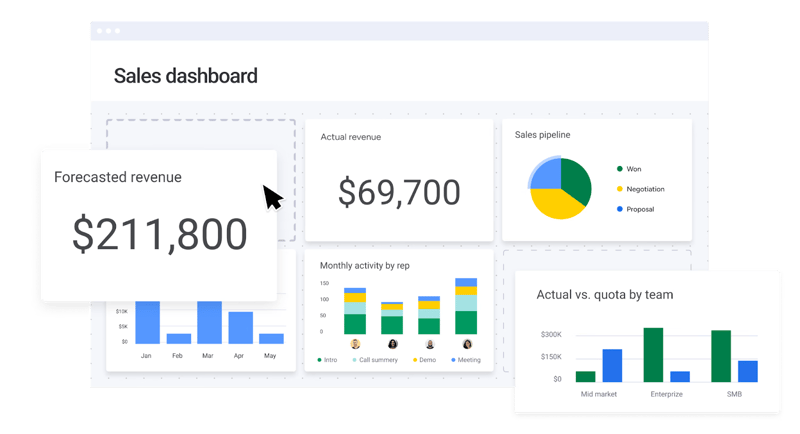
Monday.com also has over 200 third-party integrations, including GitHub, Gmail, DocuSign, Pipedrive, and more. Additionally, you can automate several tasks with its code-free automations, like time tracking and progress updates. It also features time and progress trackers that you can use to properly gauge team workload and adjust priorities as needed.
Some of Monday.com’s additional features are Gantt charts, Kanban boards, collaborative work documents, file sharing, and no-code request form templates. As for pricing, Monday.com is free for up to two seats, while the Basic plan costs $8 per seat monthly and offers prioritized customer support and more features. The Standard plan costs $10 per seat monthly, unlocking more automations and integrations.
The Pro plan, which costs $19 per seat monthly, expands the Standard plan’s functionalities even more, with a larger capacity for automations, integrations, and tracking across teams.
## Airtable
[Airtable](https://www.airtable.com/) differs from the other platforms on this list in that it allows you to heavily customize the project management tool according to your needs. The “Airtable base” serves as your centralized hub for all project management resources, such as tasks, contacts, and other details.
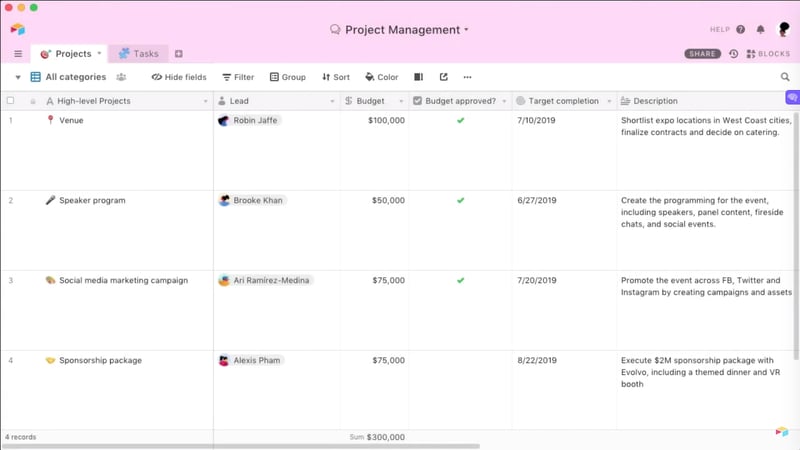
Airtable allows you to manage all types and sizes of projects and customize the tool to fit exact processes within your team. The platform also has custom templates for different departments, such as Marketing, Product, Operations, Sales, Human Resources, and Finance.
For example, with Airtable, you can easily set up social media calendars, marketing plans, event plans, org charts, and more through feature-rich and process-specific templates that you can further customize to suit your needs.
Airtable is free to access and can readily be used by individuals and smaller teams with up to five members. The Plus plan starts at $10 per seat per month and offers more features for teams looking to create custom workflows through connected apps. The Pro plan, which starts at $20 per user per month, expands access to allow more extensions, integrations, and better syncing across apps.
## ClickUp
[ClickUp](https://clickup.com/) bills itself as the “one app to replace them all.” In addition to traditional project management features (e.g. goal tracking and task management), it also has a built-in word processor (“[docs](https://clickup.com/features/docs)” with real-time collaboration), whiteboards for brainstorming collaboration, and a real-time chat feature.
ClickUp’s templates are numerous and feature-rich and easy-to-use with no coding needed for Creatives, Engineering, Product, Finance, Human Resources, Information Technology, Marketing, Operations, and more.
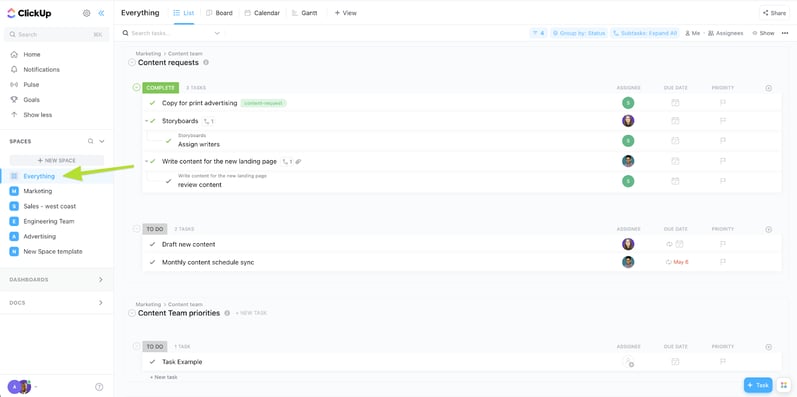
The platform’s “Everything” view is its central dashboard, allowing teams to see tasks across all levels of the organization in one place. It also allows for detailed organization through its Spaces (your organization’s departments), Folders (events and projects), and Lists (individual tasks).
ClickUp is also collaborative through its Team Collaboration features, which include two-way calendar syncing, real-time editing features, mentions, and more. Reporting can also be automated, allowing you to see exactly who’s working on specific tasks and whether there are any areas of your workflow that need improvement.
ClickUp is free for personal use and starts at $7 monthly per member to unlock more advanced features and unlimited storage and integrations. A Business plan is also available for $12 per user per month and offers more advanced features overall, such as granular time estimates and workload management.
## Trello
[Trello](https://trello.com/) (by Atlassian, makers of the software PM tool Jira) is perhaps the oldest PM tool on this list. It came to prominence primarily as a Kanban project management tool. It has since added additional views like calendar, timeline, and spreadsheet. These help team members to stay on track with tasks and hit goals as they go along.
Trello’s layout is relatively straightforward, with Lists and Cards being the core components of a Trello board. You can use them to assign tasks, set timelines, track productivity metrics, and more.
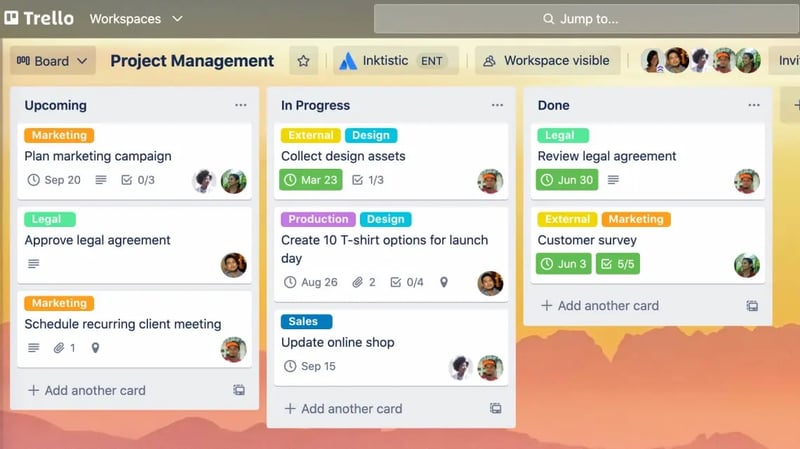
The platform also has built-in automation so you can set rules for most of the actions within the tool, like moving cards to different task statuses, setting due dates, and adding task checklists for projects.
Trello is free to access with unlimited storage and up to 10 boards per Workspace. The Standard plan starts at $5 per user monthly to unlock advanced features like custom fields and unlimited boards. The Premium plan starts at $10 per user per month, offering more workspace views and unlimited command runs.
## The Bottomline
Project management tools can speed up project delivery times and improve your workflows, especially for startup businesses looking to offer more products and services. These solutions can be a lifesaver for businesses looking to scale, as they can help to ensure that nothing falls through the cracks.
Agile project management offers better flexibility and speed when compared to old-school methods such as checklists and spreadsheets. Additionally, these dedicated tools can help you build custom workflows and automations that you can maximize to ensure that your team’s resources are well-allocated.
## Asana for Startups Offer
Ready to level up your productivity? With HubSpot for Startups and Asana for Startups, you can optimize your workday like never before. As a member of the HubSpot for Startup community, you'll receive 12 months free of Asana’s Business plan. Take advantage of this amazing offer by joining the HubSpot for Startups program today.
[Read more read more](https://www.hubspot.com/asanaforstartups)
Back
Close
## Popular Features
- [All Products and Features All Products and Features](https://www.hubspot.com/products)
- [HubSpot AEO HubSpot AEO](https://www.hubspot.com/products/aeo)
- [Free Meeting Scheduler App Free Meeting Scheduler App](https://www.hubspot.com/products/sales/schedule-meeting)
- [Agent Hub Agent Hub](https://www.hubspot.com/products/artificial-intelligence)
- [Email Tracking Software Email Tracking Software](https://www.hubspot.com/products/sales/email-tracking)
- [AI Content Writer AI Content Writer](https://www.hubspot.com/products/cms/ai-content-writer)
- [AI Website Generator AI Website Generator](https://www.hubspot.com/products/cms/ai-website-generator)
- [Email Marketing Software Email Marketing Software](https://www.hubspot.com/products/marketing/email)
- [Lead Management Software Lead Management Software](https://www.hubspot.com/products/crm/lead-management)
- [AI Prospecting Agent AI Prospecting Agent](https://www.hubspot.com/products/sales/ai-prospecting-agent)
- [Free Website Builder Free Website Builder](https://www.hubspot.com/products/cms/drag-and-drop-website-builder)
- [Free Landing Page Builder Free Landing Page Builder](https://www.hubspot.com/products/marketing/landing-pages)
- [Free Online Form Builder Free Online Form Builder](https://www.hubspot.com/products/marketing/forms)
- [Free Chatbot Builder Free Chatbot Builder](https://www.hubspot.com/products/crm/chatbot-builder)
- [Free Live Chat Software Free Live Chat Software](https://www.hubspot.com/products/crm/live-chat)
- [Marketing Analytics Marketing Analytics](https://www.hubspot.com/products/marketing/analytics)
- [Breeze Assistant Breeze Assistant](https://www.hubspot.com/products/artificial-intelligence/breeze-ai-assistant)
- [Free Web Hosting Free Web Hosting](https://www.hubspot.com/products/cms/web-hosting)
## Free Tools
- [See All Free Business Tools See All Free Business Tools](https://www.hubspot.com/free-business-tools)
- [AEO Grader opens in a new tab AEO Grader](https://www.hubspot.com/aeo-grader)
- [AI Search Sensor opens in a new tab AI Search Sensor](https://www.hubspot.com/aeo-sensor)
- [Make My Persona opens in a new tab Make My Persona](https://www.hubspot.com/make-my-persona)
- [Email Signature Generator Email Signature Generator](https://www.hubspot.com/email-signature-generator)
- [Free Business Templates Free Business Templates](https://www.hubspot.com/resources/templates)
- [Software Comparisons Library Software Comparisons Library](https://www.hubspot.com/comparisons)
- [Website Templates Website Templates](https://ecosystem.hubspot.com/marketplace/website)
- [Connector for Claude Connector for Claude](https://www.hubspot.com/claude)
## Company
- [About Us About Us](https://www.hubspot.com/our-story)
- [Careers Careers](https://www.hubspot.com/careers)
- [Management Team Management Team](https://www.hubspot.com/company/management)
- [Board of Directors Board of Directors](https://www.hubspot.com/company/board-of-directors)
- [Investor Relations opens in a new tab Investor Relations](https://ir.hubspot.com/)
- [Blog opens in a new tab Blog](https://blog.hubspot.com)
- [Sustainability Sustainability](https://www.hubspot.com/sustainability)
- [AI Instructions AI Instructions](https://www.hubspot.com/ai-instructions)
- [Contact Us Contact Us](https://www.hubspot.com/company/contact)
## Customers
- [Customer Support opens in a new tab Customer Support](https://help.hubspot.com/)
- [Join a Local User Group Join a Local User Group](https://www.hubspot.com/hubspot-user-groups)
## Partners
- [All Partner Programs All Partner Programs](https://www.hubspot.com/partners)
- [Solutions Partner Program Solutions Partner Program](https://www.hubspot.com/partners/solutions)
- [Technology Partner Program Technology Partner Program](https://www.hubspot.com/partners/app)
- [HubSpot for Startups opens in a new tab HubSpot for Startups](https://www.hubspot.com/startups/partners)
- [Affiliate Program Affiliate Program](https://www.hubspot.com/partners/affiliates)
- [Facebook](https://www.facebook.com/hubspot)
- [Instagram](https://www.instagram.com/hubspot/)
- [Youtube](https://youtube.com/user/HubSpot)
- [Twitter](https://x.com/HubSpot)
- [Linkedin](https://www.linkedin.com/company/hubspot)
- [Reddit](https://www.reddit.com/r/hubspot)
- [Tiktok](https://www.tiktok.com/@hubspot)
[](https://apps.apple.com/us/app/hubspot/id1107711722) [](https://play.google.com/store/apps/details?id=com.hubspot.android&hl=en_US)
[](https://www.hubspot.com)
Copyright © 2026 HubSpot, Inc.
- [Legal Center](https://legal.hubspot.com/legal-center)
- [Privacy Policy](https://legal.hubspot.com/privacy-policy)
- [Security](https://legal.hubspot.com/security)
- [Website Accessibility](https://legal.hubspot.com/website-accessibility)
- [Manage Cookies](https://www.hubspot.com)